Showing posts with label Firmware. Show all posts

Monday, 30 June 2025

Western Digital My Passport USB hard drive successful data recovery


Western Digital My Passport USB hard drive successful data recovery


Western Digital My Passport  USB Hard drive data recovery


⚙️ Device Specifications

  • External Drive: Western Digital My Passport
  • Model Number: WD10SDZW
  • Storage Capacity: 1TB (1000GB)
  • Drive Interface: 2.5" USB 3.0
  • File System Format: HFS+

🔍 Free Evaluation – Initial Diagnosis

A client contacted us regarding a non-responsive Western Digital My Passport external hard drive that failed to mount on their Mac system. As part of our free data recovery evaluation, we discovered the issue stemmed from severe bad sectors, typically caused by prolonged use. Due to the advanced degradation, we implemented a USB to SATA interface conversion and made critical adjustments to the service area for deeper access.


💾 Expert Data Recovery Process


  1. USB to SATA Interface Conversion
    Western Digital USB drives limit low-level access to firmware areas. To overcome this, we used a specialized adapter to convert the USB board to a SATA interface. This included capacitor removal and precision soldering of key contact points for reliable connectivity.
  2. Western Digital My Passport  USB Hard drive USB to SATA
    Service Area Repair & Firmware Optimization
    Western Digital drives often suffer from slow read speeds due to firmware degradation. We backed up and optimized key service modules to stabilize performance and gain deeper access to affected sectors.
  3. Head Map Customization Using PC-3000
    Using our advanced PC-3000 data recovery tools, we built a custom head map to bypass failing read heads—specifically, head #1. Our engineers initially used the stronger heads to extract stable sectors and then returned to recover data from the weak head with precision.
  4. Targeted File Recovery & Full Drive Cloning
    We prioritised mission-critical data and successfully retrieved all key files. A full sector-by-sector clone of the original disk was then created to safeguard the integrity of the recovered data and provide a future-proof backup solution for the client.
  5. Read Error Management & Data Integrity Checks
    Throughout the process, we encountered and resolved multiple read errors. By employing advanced error-handling techniques, we ensured maximum data retrieval with minimal loss, restoring as much of the original structure as possible.


✅ Outcome: 100% Data Recovery Success

Our meticulous approach resulted in the full recovery of the client’s essential data from their damaged Western Digital drive. From initial diagnosis to final delivery, we ensured data security, operational transparency, and peace of mind.

🔗 Facing a similar issue? Book your free evaluation today with Disk Doctors—the trusted name in advanced Mac and  Western Digital hard drive data recovery.

Would you like this formatted for use in a service page or review response as well? I can also highlight specific keywords to boost discoverability in search engines.


Western Digital My Passport  USB Hard drive data recovery


Western Digital My Passport  USB Hard drive data recovery

Western Digital My Passport  USB Hard drive data recovery


Saturday, 7 December 2024

Expert Data Recovery from a Toshiba 2TB USB Hard Drive

Toshiba 2TB USB hard drive data recovery
Toshiba USB Hard Drive 

Expert Data Recovery from a Toshiba 2TB USB Hard Drive


Losing access to essential data can be incredibly frustrating. Recently, we successfully retrieved critical data from a faulty Toshiba 2TB USB hard drive.


Device Information

  • USB Case: Toshiba AZA AA01/JT000U
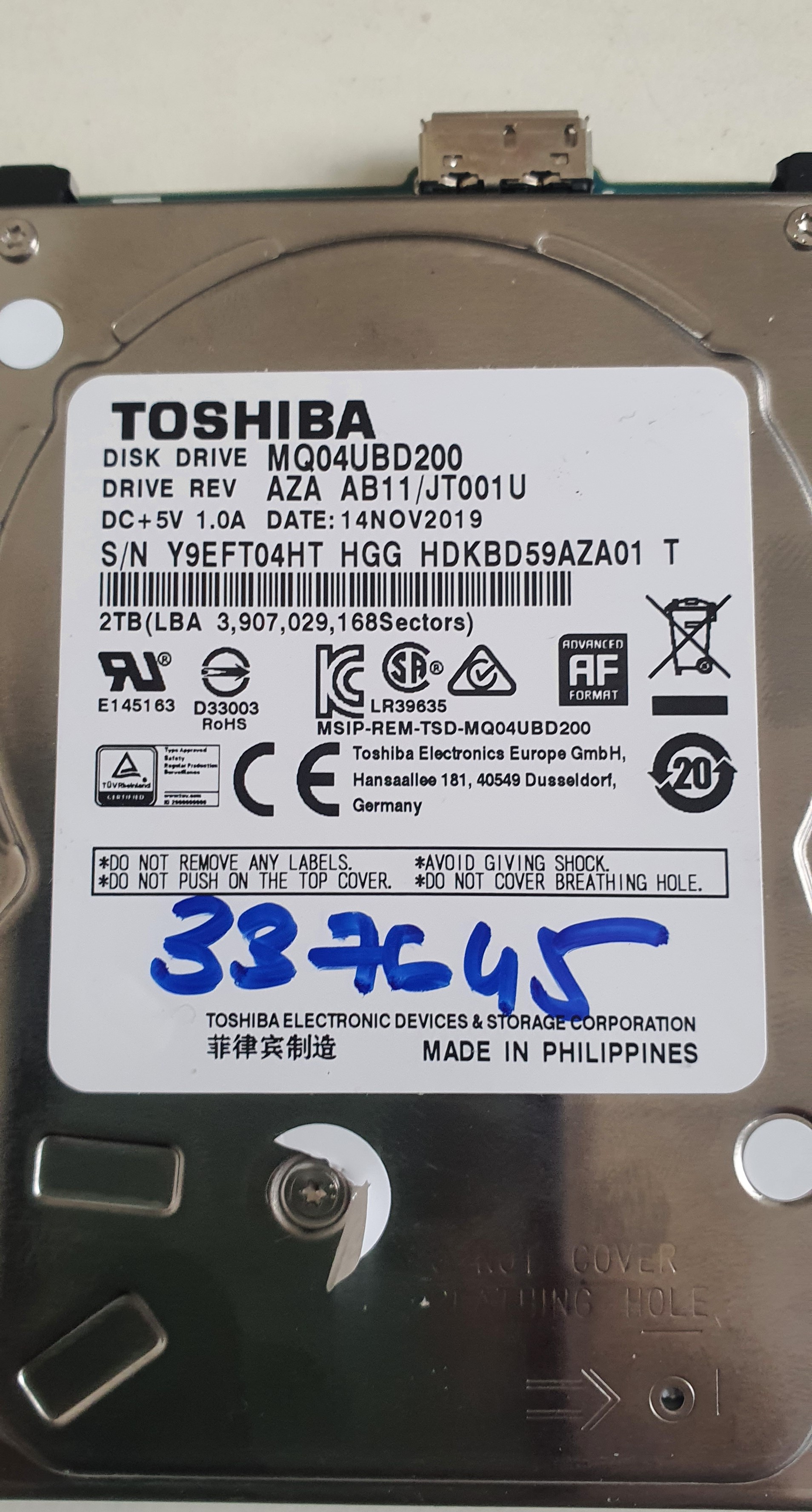
  • Model: MQ04UBD200
  • Capacity: 2TB
  • Interface: 2.5" USB 3.0

Free Evaluation and Initial Diagnosis

A social media influencer came to us after losing access to their important files stored on a Toshiba drive. After a thorough evaluation, we found that the drive had bad sectors and weak read-write heads. These drives feature integrated USB boards with drive electronics, complicating direct access to the service area. To overcome this, we replaced the USB electronics with SATA PCB/electronics for effective service area adjustments and head map creation.


Toshiba 2TB  MQ04UBD200 hard drive data recovery
Toshiba MQ04UBD200 Hard Drive


Step-by-Step Data Recovery Process

  1. USB to SATA PCB Replacement: We replaced the USB board with a compatible SATA board that had an exact matching controller.
  2. Firmware Access: Using the advanced PC3000 tool, we unlocked the drive's firmware/service area.
  3. Parameter Loading: Loaded all crucial parameters from the service area to ensure a smooth recovery process.
  4. Service Area Backup: Backed up critical service area information to protect against any potential data loss during the recovery.
  5. Head Map Creation: Constructed a detailed head map for accurate and efficient data recovery.
  6. Data Recovery and Cloning: Carefully recovered the client’s critical data and created a full clone of the hard drive, ensuring data integrity and providing a complete backup.
  7. Managing Read Errors: Encountered and resolved several read errors to maximize the recovery of data without compromising quality.


Successful Outcome

Through meticulous planning and execution, we successfully recovered all the critical data from the faulty Toshiba hard drive. This success story highlights our dedication to utilizing advanced data recovery techniques and maintaining the highest standards of service.


Positive review

We received a review from this happy client on the successful data recovery at data recovery reviews


Get in Touch

If you’re experiencing similar issues or need hard drive repair, contact Disk Doctors at our data recovery london lab. Our expert team is ready to provide a professional assessment and secure data recovery, ensuring your valuable data is safe.


Toshiba MQ04UBD200 Hard Drive - Back


Toshiba USB Hard Drive


Other Toshiba Data Recovery case examples:

Toshiba data recovery


Monday, 30 September 2024

Seagate ST2000DM001 Hard drive Cliking Sound


Recovering Data from Seagate ST2000DM001 Hard Drive

Seagate ST2000DM001 hard drive data recovery
Seagate 2000GB hard drive

The Seagate ST2000DM001 is a well-regarded 2TB hard drive, known for its reliability and performance. However, like all mechanical devices, it can experience issues over time. This article provides a detailed overview of common problems, symptoms, and the data recovery process for this specific model.

Common Issues and Symptoms

Model: Seagate ST2000DM001
Capacity: 2TB
Firmware: CC45
Interface: 3.5" SATA

Failure Symptoms:

  • Read Problems: Difficulty accessing or reading data.
  • Bad Blocks: Sections of the drive that are no longer writable or readable.
  • Clicking Sounds: Indicative of mechanical failure.
  • Data Inaccessibility: The drive is recognized, but data cannot be accessed.

Diagnosis and Evaluation

When a Seagate ST2000DM001 hard drive exhibits these symptoms, it is crucial to perform a thorough evaluation. In our case, we identified issues with the translation in the service area of the drive, the clicking sound was due to translation corruption. The service area is critical for the drive’s operation as it contains essential firmware and configuration data.

Data Recovery Process

To recover data from a failing Seagate ST2000DM001, we followed a meticulous process using advanced tools like PC3000. Here’s a step-by-step breakdown:

  1. Backup of Service Areas: We started by creating a backup of all service areas.
  2. Check for User Data Entries: We inspected the service areas for any user data entries.
  3. Regenerate the Translator: The translator is responsible for mapping logical block addresses to physical locations on the disk. We regenerated it to correct any inconsistencies.
  4. Create a Head Map: This helps in identifying which heads are functional and which are not, made a head map. 
  5. Clone User Data: Finally, we cloned all user data to a new, healthy drive.

Successful Data Recovery

We successfully recovered all user data from a Seagate ST2000DM001 hard drive that had read problems and bad blocks. The drive was making clicking sounds, and data was initially inaccessible. Through our detailed recovery process, we ensured that no data was lost.


Sunday, 22 September 2024

Western Digital My Passport USB WD10SMZW


Western Digital My Passport USB Hard Drive Successful Data Recovery


Make: Western Digital My Passport USB Hard Drive
Model: WD10SMZW – 11YOTSO
Capacity: 1TB
Interface: 2.5 USB 


Common Issues and Symptoms

Experiencing issues with your Western Digital My Passport USB hard drive? Here are some common symptoms to watch out for:

  • Firmware Issues
  • Read Problems
  • Bad Blocks
  • Slow Reading Speeds
  • Occasional Clicking Sounds
  • Partial Data Accessibility


Initial Evaluation

Our Data Recovery London team recently encountered a Western Digital drive exhibiting these exact problems. The drive was recognized by the system but had slow reading speeds and occasional clicking sounds, making the USB interface less than ideal for data recovery.


Data Recovery Process

To address these issues, we followed a meticulous data recovery process:

  1. ROM Backup and Conversion: We backed up the original ROM on the Drive’s USB board and converted it to a compatible SATA PCB board with a matching controller. The ROM information was then transferred to the SATA PCB.
  2. Firmware Adjustment: Using PC3000, we backed up the service area, and adjusted the service area (firmware) to resolve the slow read issue.
  3. Head Map Creation and Clone: A head map and a clone were created to manage the drive’s bad sectors effectively.


Conclusion

Thanks to our thorough process, we successfully recovered all user data from the drive.


Contact us

 If you encounter similar data accessibility issues with your Western Digital or any other USB hard drive, don’t hesitate to contact us for professional assistance.


Western Digital My Passport USB hard drive, 1TB capacity
Western Digital My Passport USB HD


Western Digital My Passport USB hard drive, 1TB capacity
Front side - Western Digital Hard Drive WD10SMZW


Western Digital My Passport USB hard drive, 1TB capacity
 Back side - Western Digital Hard Drive WD10SMZW

Saturday, 7 September 2024

Seagate ST4000LM024 hard drive recovery

Seagate ST4000LM024 Hard Drive USB


Make: Seagate
Model: ST4000LM024
Capacity: 2TB
Interface: 2.5" SATA (USB)
Failure: Service area corruption (Translation issues)
Symptoms: The drive is not recognized.


A Seagate 4TB hard drive (Model: ST4000LM024) was brought to our data recovery lab because it was not being recognized by the system. This issue can be particularly distressing for users who rely on their hard drives for storing important data, whether personal or professional.


Initial Evaluation

Upon receiving the drive, we conducted a thorough, free evaluation to diagnose the problem. Our analysis revealed that the issue was related to the service area of the drive, specifically a translation problem. The service area is a critical part of the hard drive’s firmware that manages how data is read and written. When this area is corrupted, the drive cannot be recognized by the system.


Data Recovery Process

To address the issue, we employed the PC3000 tool, a sophisticated piece of equipment designed for data recovery and hard drive repair. The first step in our process was to back up all important service area information to ensure that no further data loss would occur. This backup is crucial as it allows us to restore the drive to its original state if needed.

Next, we made precise adjustments to the service area to correct the translation issues. This involved recalibrating the drive’s firmware so that it could correctly interpret and access the stored data. Once these adjustments were made, the drive was recognized by the system with its correct ID parameters.


Successful Data Recovery

With the drive now recognized, we were able to access and recover all user data. The successful recovery of data is always our primary goal, and in this case, we were able to restore full access to the user’s files without any data loss.


Conclusion


If you are experiencing similar issues with your Seagate hard drive or any other hard drive, do not hesitate to contact us. Our team of experts is equipped with the tools and knowledge to handle a wide range of data recovery scenarios. We offer free evaluations and are committed to providing the best possible service to recover your valuable data.


Seagate ST4000LM024 Hard
Seagate ST4000LM024 Hard Drive 


Wednesday, 21 August 2024

Toshiba MQ04UBD200 USB data recovery


Make: Toshiba USB Hard Drive

Model: MQ04UBD200 AZA AB11/JT001U

Capacity: 2TB

Interface: 2.5 USB

Failure: Firmware issues, read problems, bad blocks


Symptoms: Recognised with slow reading and data is not fully accessible.  


Toshiba USB Hard Drive
Compitable SATA PCB


The Toshiba USB drive experienced read issues and slow access speeds, making the USB interface suboptimal for data recovery. We converted it to a compatible SATA PCB board with a similar controller to the one on the USB PCB board and transferred the ROM information to the SATA PCB.

In PC3000, the service area (firmware) was adjusted, and a head map was created due to one of the heads being weak; the drive also had bad sectors.

We cloned all user data, starting with the good heads and then with the weak head, resulting in successful data recovery.

Should you encounter data accessibility issues with your Toshiba or any other USB hard drive, please feel free to reach out to us for assistance.


Saturday, 10 August 2024

Seagate ST4000DM000 hard drive not accessible


Make:

Seagate Hard Drive
Model:
ST4000DM000
 
Capacity:4000GB
Firmware:CC54
Interface:3.5 SATA
Failure:Firmware issues
Symptoms:
 Not recognised, not accessible, incorrect ID data


The drive clicked on read.

Adjusted the firmware with the help of the same firmware from a backup, cloned in PC3000 despite read errors, all data was recovered successfully.


Monday, 13 January 2014

Maxtor STM3500320AS firmware issue

           Seagate / Maxtor hard drive with firmware damage
  
Model:STM3500320AS
Capacity:500GB
Firmware:MX15
Interface:3.5 SATA
Failure:Firmware problem
Symptoms:normal spin, no strange sound but not recognised
         
This drive had a problem with firmware problem, makes no unusual sound but the drive is no longer recognised. Disk Doctors recovered 100% data from this hard drive.